
Summary
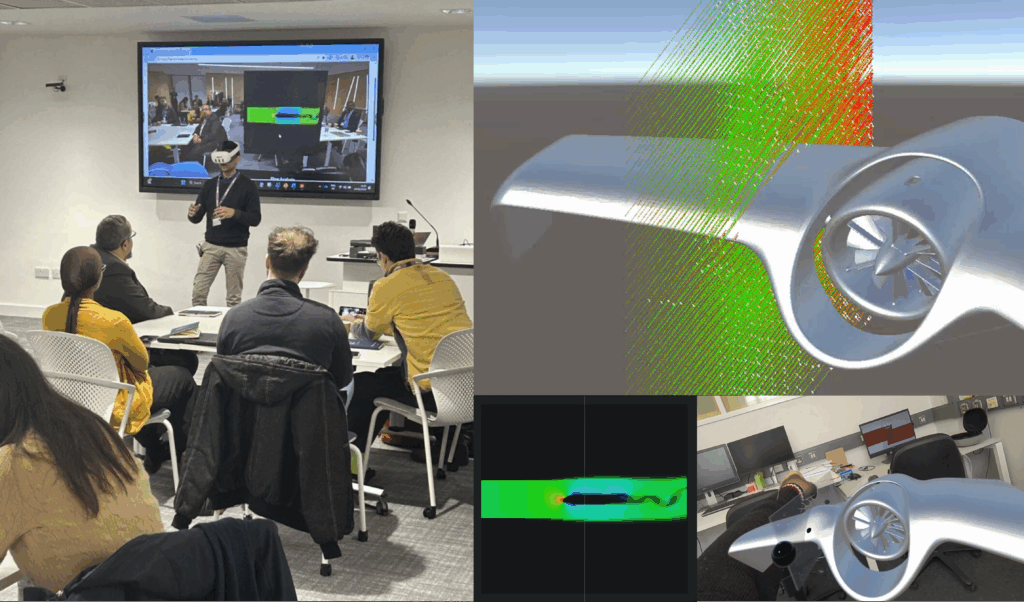
Researchers at the DMF lab, University of Bristol, UK, recently presented their latest research at the D2N+ network case study 1 workshop. The aim of this work was to explore how Mixed Reality (MR) can support faster, more interactive engineering design through a digital design workflow based on low-fidelity computational fluid dynamics (CFD)-style simulations. The work focused on developing and demonstrating an MR-based design environment in which airflow behaviour could be visualised around a drone wing at real scale, while also allowing the geometry to be modified and the simulation to update accordingly. Ultimately, it could provide an early-stage design tool that supports rapid exploration, discussion, and iteration. This blog provides information regarding the problem and the proposed solution.
Problem
A persistent challenge in engineering design is the gap between early-stage conceptual thinking and the time, cost, and effort required to evaluate design changes. For problems involving fluid flow or aerodynamic behaviour, this challenge is even more pronounced. This is because conventional CFD tools are often too slow, specialised, and workflow-intensive to support design iterations/changes. Therefore, the current pipeline may prevent designers from exploring the full design space and, as a result, potentially useful design ideas. The problem addressed in this work was, therefore, how to create a digital design tool that enables more immediate, embodied, and accessible exploration of flow analysis related design decisions in the context of drone design.
Solution
The solution developed in this work is an MR-based low-fidelity CFD-style simulation platform for the design of drone wings. The system allows a user to visualise airflow behaviour around a wing in Mixed Reality at real scale, modify the freeform geometry of the wings, and observe updated simulation behaviour as the design changes, in real time. It was designed in Unity 6 using the Meta SDK package and coded in C#. It was then built as an Android package and deployed to the Meta Quest 3 headset to run untethered, demonstrating the system’s portability and low-cost access.
Fig. 1 shows the flow diagram of the developed system. The user in Mixed reality (MR) can interact with the scene in three ways: 1. Change geometry by grabbing and moving control points (Fig. 2 (a)), 2. Change the location of the plane of intersection (analysis plane, Fig. 2 (b)), and 3. Change the simulation mode (Fig. 2 (c)).
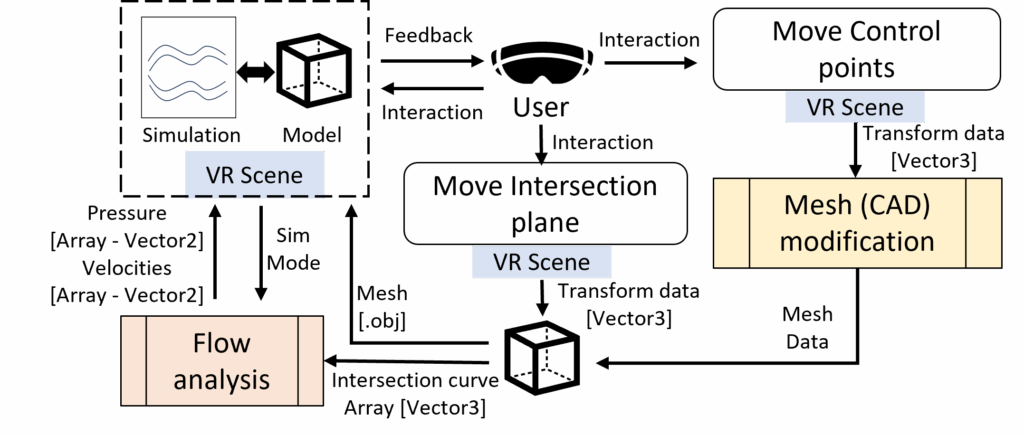
Figure 1: Flow diagram of the proposed digital design solution
The system has two main processing modules that work in the back-end to enable user-interaction: 1. Mesh modification, and 2. Flow analysis.
Mesh modification was performed using control points to locally deform the geometry. When a control point is moved, all mesh vertices within a specified radius of influence are identified and displaced accordingly. The displacement applied to each vertex is weighted based on its distance from the control point, with closer vertices undergoing larger transformations and farther ones smaller adjustments. This distance-based weighting ensures smooth, continuous deformations of the mesh rather than abrupt changes.
The flow analysis was implemented using a grid-based fluid simulation. The domain was first initialised by defining a simulation grid with velocity fields, pressure, and a scalar field representing smoke. The simulation then iteratively updates by solving for incompressibility using a Gauss–Seidel-based pressure correction, and updating velocity fields accordingly. Flow behaviour is propagated using semi-Lagrangian advection, where both velocity and smoke fields are transported across the grid over time. This enables real-time visualisation of airflow patterns around geometries within the defined domain.
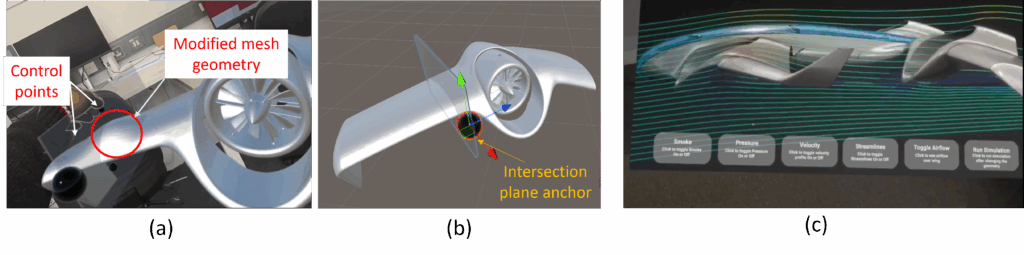
Figure 2: Controls: (a) Geometry Modification, (b) Modify Plane of Analysis, (c) Change Mode of Simulation
The flow pattern is visualised in five different modes:
- Smoke Field (Fig. 3 (a)): Helps visualise flow direction around the wings and wake formation.
- Pressure Field (Fig. 3 (b)): Shows stagnation points and separation regions.
- Velocity Field (Fig. 3 (c)): Provide information about velocity distribution
- Streamlines (Fig. 3 (d)): Shows streamline curvatures and vortex shedding
- Full 3D Flow Simulation (Fig. 4): Gives a full 3D view of streamlines over an actual 3D model of the wing and how particles move around it.
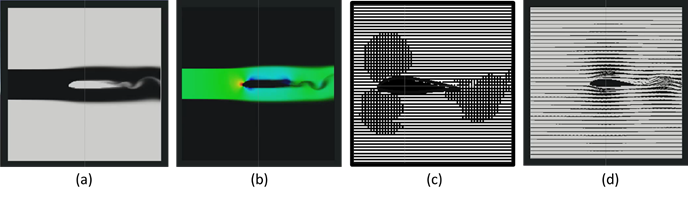
Figure 3: (a) Smoke Field, (b) Pressure Field, (c) Velocity Field, (d) Streamlines
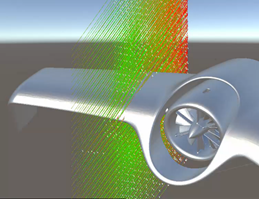
Figure 4: Full 3D air flow simulation
How could it improve engineering design?
This solution could improve digital design primarily by making early-stage design evaluation more interactive, more immediate, and less dependent on fragmented workflows.
The platform could improve design quality by allowing users to see and reason about flow behaviour directly in context and at real scale. This would support more informed discussion, earlier identification of issues, and a better understanding of performance implications during concept development. It may also help bridge communication between technical and non-technical stakeholders, since the behaviour of the design can be visualised rather than only described through drawings or static models.
The platform could also provide faster solutions by shortening the iteration loop. Instead of modifying geometry in one tool, exporting to another simulation environment, waiting for results, and then making changes again, the MR platform allows direct interaction and immediate feedback. This accelerates concept testing and allows more options to be explored within the same time window.
Conclusion
There is strong potential for MR to become more than a visualisation medium in engineering design. When combined with interactive simulation, MR can serve as a design-thinking environment where geometry, performance, and discussion can be brought together in one place.
Follow DMF Lab for more such exciting developments.